
Applies to: WebinarJam and EverWebinar
Use GDPR settings to control how you collect consent, display privacy information, and manage attendee data.
You can configure these settings from your account profile.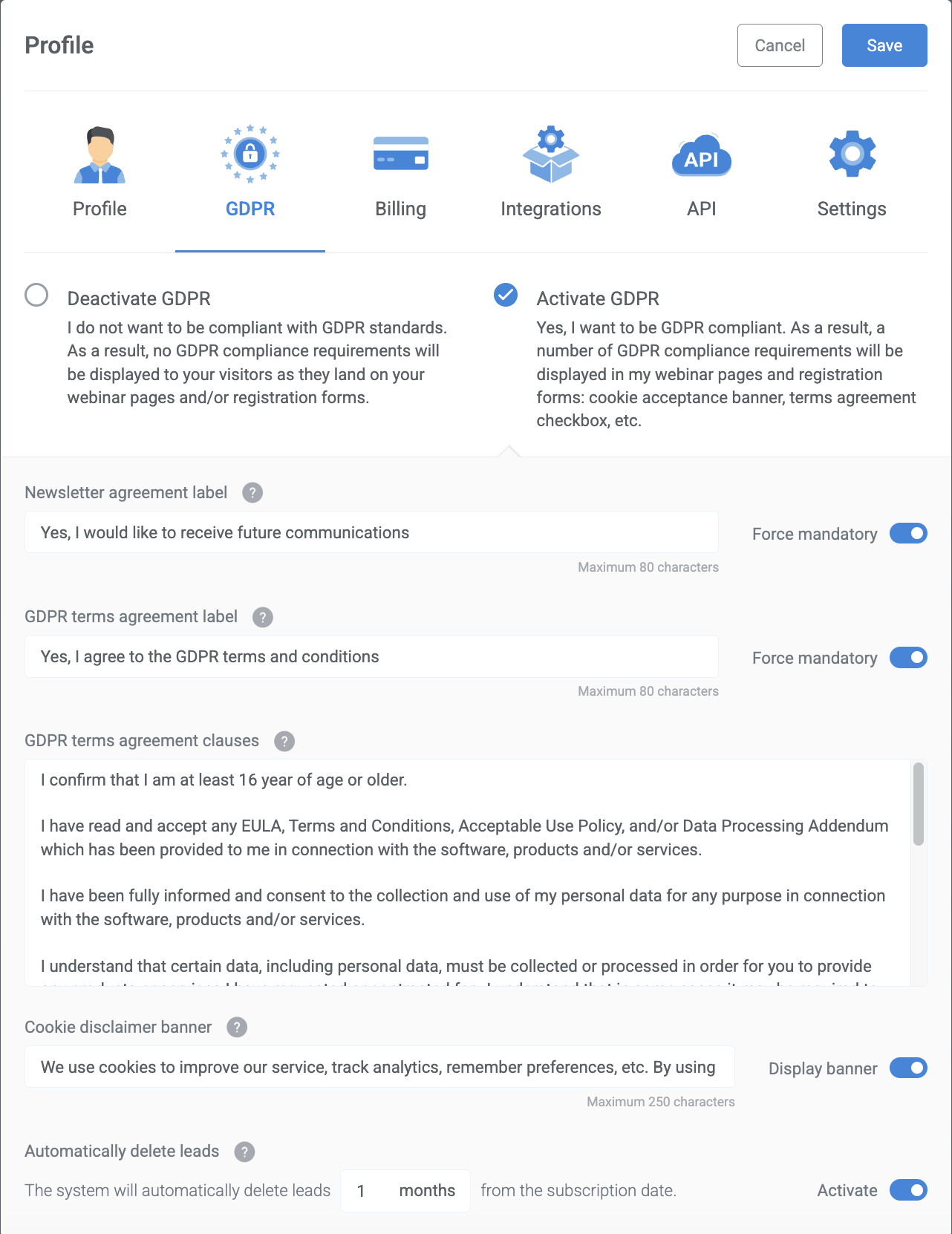
Activate GDPR compliance
Select this option if you wish for your webinar to be GDPR compliant. As a result, a number of GDPR compliance requirements will be displayed in your webinar pages and registration forms: cookie acceptance banner, terms agreement checkbox, etc.
Newsletter agreement label
- Set the general wording your audience will see when accepting to receive future communications.
- You can also set this option as mandatory.
GDPR terms agreement label
- Set the general wording your audience will see when accepting your team's GDPR terms and conditions.
- You can also set this option as mandatory.
GDPR terms agreement clauses
- Set the specific wording of the GDPR agreement required by your team's compliance standards.
Cookie disclaimer banner
- Display customized wording regarding how cookies are used.
Automatically delete leads
- The system will automatically delete leads after a set number of months from the subscription date.
Deactivate GDPR compliance
Choose this option if you do not wish to be compliant with GDPR standards. As a result, no GDPR compliance requirements will be displayed to your visitors as they land on your webinar pages and/or registration forms.