
Applies to: WebinarJam and EverWebinar
Live injections allow you to display interactive content inside the webinar room while your session is running. These tools help you guide the presentation, engage attendees, and share resources without leaving the webinar environment.
You configure injections during the Live step of your webinar setup.
How injections work depends on whether you are running a live webinar in WebinarJam or an automated webinar in EverWebinar.
Use the sections below to explore the available injection types.
WebinarJam live injections
In WebinarJam, injections are prepared during setup and launched manually during the webinar by presenters or moderators.
These tools allow you to control when content appears for attendees in the webinar room.
Learn more about the live room interface.
Live agenda
The live agenda shows attendees the structure of your webinar and highlights the current segment as the presentation progresses.
Use this option if you:
- Want to outline the flow of your webinar
- Want attendees to see what section of the presentation you are in
- Want presenters to follow a structured agenda
Learn how to set up a live agenda.
Polls
Polls allow you to ask questions and collect responses from attendees during the webinar.
Use this option if you:
- Want to increase audience participation
- Want to gather feedback from attendees
- Want to introduce interactive moments during the presentation
Learn how to create polls.
Product offers
Product offers display a panel in the webinar room with details about a product or service and a button linking to your sales page.
Use this option if you:
- Want to promote a product during your webinar
- Want attendees to access a purchase link while the webinar is running
Learn how to add product offers to your webinar
Video injections
Video injections allow you to play pre-recorded videos during your webinar without sharing your screen.
Use this option if you:
- Want to insert recorded segments into your live presentation
- Want to combine live speaking with pre-recorded content
Learn how to add video injections.
Slide presentations
Slides allow you to present a slide deck directly inside the webinar room.
Use this option if you:
- Want to present slides without screen sharing
- Want smoother presentation playback from the webinar platform
Learn how to add slide presentations.
File handouts
File handouts allow you to share downloadable resources with attendees during the webinar.
Use this option if you:
- Want to distribute guides, worksheets, or resources
- Want attendees to download materials during the presentation
EverWebinar injections
In EverWebinar, injections are scheduled during setup and triggered automatically during the automated webinar.
These tools help simulate the experience of a live event while the webinar runs on autopilot.
At the Live step of the configuration wizard, open the Live content module to add scheduled injections. Scheduled injections are configured to appear and disappear at specific times during the event.
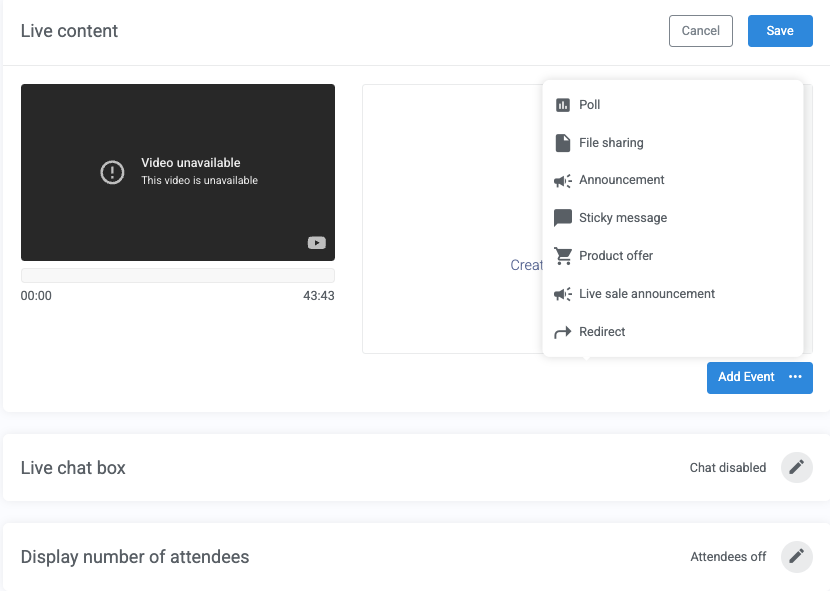 Polls
Polls
Display a poll during the automated webinar so attendees can interact with the presentation.
Use this option if you:
- Want to simulate audience engagement
- Want attendees to interact with the webinar
Learn how to create polls for your webinar.
File sharing
Files can be scheduled to appear at a specific moment in the webinar.
Use this option if you:
- Want to distribute downloadable resources during the presentation
- Want files to appear automatically at the right moment
Announcements and sticky messages
Announcements allow you to display messages in the chat panel during the webinar.
Use this option if you:
- Want to highlight important messages
- Want specific messages to remain visible in the chat
Product offers
Product offers can be scheduled to appear during the automated webinar.
Use this option if you:
- Want to promote a product during your automated presentation
- Want attendees to access a purchase page at a specific point in the webinar
Learn how to add product offers to your webinar.
Simulated engagement tools
EverWebinar also includes tools that simulate live activity during automated webinars.
These include:
- Live sale announcement showing recent purchases
- Simulated chat messagesappearing during the session
- Learn how to create and import a chat file into EverWebinar
- Attendee count displays showing viewers in the room
- Redirect events, sending attendees to another page